


Description
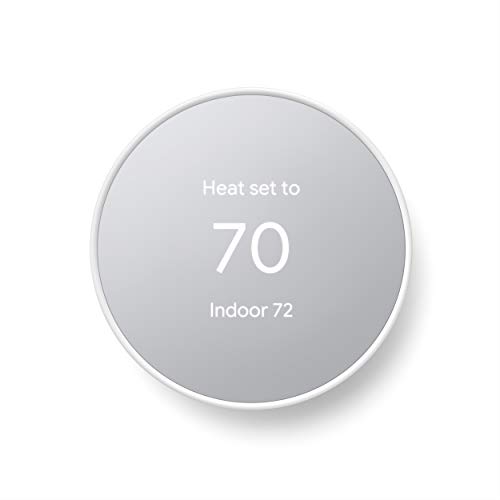
Google Nest Thermostat (Snow, GA01334)
Item details:
Brand new in retail box
Sold by VAT registered UK company
We are a high rated retailer with a track record of excellent service
We only sell high quality products
£219.00
Out of stock
Google Nest Thermostat (Snow, GA01334)
Item details:
Brand new in retail box
Sold by VAT registered UK company
We are a high rated retailer with a track record of excellent service
We only sell high quality products
| Product code | CA56779 |
|---|---|
| Barcode | 0193575007649 |
| Weight | 0000000000001 |
| Brand |
You must be logged in to post a review.
eagle02 –
Our 1st smart thermostat…easy install…sleek design
book addict –
Frustrating controls on thermostat
EdisonAndWylla –
Tiny – will NOT fit standard AC control rough opening
Jon Boy –
Set up is a nightmare, No instructions given in box.
emma –
Contact the owner for a brand-new device?
Claudia Schimansky –
I ordered sand expecting a rose gold but didnt realize the face of the thing is a mirror so it looks like straight chrome. I dont hate it but took some getting used to. The control on the actual thermostat is so hard to use. Instead of spinning the dial and pressing in to select, there is a 2 inch strip that you control with your finger, its not intuitive and its very hard to use. I wish I had gotten the same model I had at my last house. It may be older and less sleek but much easier to use when controlling at the thermostat. This is my first google home product, and set up with the app was super easy. The controls are so annoying and frustrating to use, I gave it 2 stars. When I start touching that control strip Im trying to turn the heat up and suddenly Ive selected disconnect WiFi and then Im trying to keep my finger within the right range to get back and then Im on another random screen because I messed up with my finger again. Im too lazy to disconnect and return.
Biondo –
The product does NOT look the way it looks in the advertised images. The advertised images show a frosted display. The actual thermostat has a shiny, mirror-like display. I purchased because I liked the frosted look.Additionally, I dont believe theres an option to keep the display on. You either have to walk up to it (which doesnt seem to work anyway), or touch the unit (sometimes more than once) to wake it up.The only positive is that the app appears to work for setting a schedule and controlling temperature.Overall, pretty disappointed.
salamaan –
Google has me stumped. Opened and immediately could see the unit is about 60% of standard AC rough opening. Screw holes do not align. I was baffled. Contacted Google via chat and their exact response was yes, they are a bit small. So unless you plan some significant rough opening redo, dont buy. Wont work. I assumed there was some conversion kit for a standard opening but none was offered. I cant believe Google would do this. I even contacted ClickElectronicss tech experts. Their only offered solution was to return item. Unbelievable from Google!
Linda Lind –
You must download the google home app to get info. This new model isn’t anywhere to be found on the internet & all instructions are geared to the older units. The temp is reading 2-3 degrees cooler than the old unit I replaced this with? so what was 78 degrees now has to be set at 75. Also very difficult to navigate through app. scheduling temp settings is driving me nuts. If I don’t get this thing figured out by tomorrow its going back as a refund me my money.
Walter y Ana –
I was looking for a basic, smart thermostat for our cabin so I could monitor the temperature over the winter in the event of heating issues or someone kicking the door in and it freezing inside; and also, because we turn the heat way down while not there, I could turn it back up on the way there and have it already warm when we arrive. As I read reviews on this thermostat, which I kept going back to when I reviewed others, it seemed like most complaints were about needing a “c” wire to the thermostat and Google not disclosing that. I can’t speak to that as I’m not sure it’s absolutely necessary, I knew nothing of wiring a thermostat to a furnace. I went into it though assuming I needed a “c” wire and researched different ways to do it. There were other complaints like displayed temperature inaccuracies, but at the end of the day I went with the basic Google Nest in sand color (looks pink to me). I’m glad I spent the time researching ahead of time and, so far, glad I didn’t listen to the “don’t buy this product” reviews. Does exactly what I want it to do, easy to use, displays perfectly accurate temperature, and was easy to install (again, glad I researched quite a bit and was prepared). Now for my install experience: Just for the record, my cabin furnace is heat only, so I only really needed 2 low voltage wires from the thermostat to the furnace. The existing cable had 3 wires however, one of which (the green one) was not hooked up at either end. FYI, take the advice of the “how to” videos and take a picture of the wire locations on the old thermostat before removing them, and make sure the furnace breaker is off too. The green wire, as I researched, is usually for operating the furnace fan separate from when it’s on for heating or cooling, something I, and probably most people, don’t use. The white and red wires were hooked to their corresponding letter coded (R&W) spaces on the thermostat and furnace. I had purchased a plug-in 24v transformer with a long set of wires, based on my previous research, to use as the “c” wire, which I learned supplies power to the thermostat. I intended on plugging it into a nearby outlet, running the wire alongside some doorframe trim, which would hide the wire, and into the wall behind the new thermostat. This, I think, would have worked just fine. I also learned though, from watching another “how-to” video just before I started the project, that all furnaces have a 24v connection space along with where all the other thermostat wires would go. So I just hooked the unused green wire to the “c”, or 24v, spot on the furnace and to the “c” connector on the Nest thermostat. *The Nest comes with wire identifying stickers and I did label this wire on both ends to indicate it’s now the power wire. Once the wiring was done, turned the breaker back on and followed the install directions from the Google Home app. The only minor issues I had was that the display was in Celsius, not Fahrenheit, and it took me awhile to figure out that this needed to be changed via the phone app, not the thermostat. There may be a way, but I couldn’t figure that out. Also, was a little nervous because of the previous reviews I read when the initial temperature displayed about 4-5 degrees above the actual temperature, but by the time I cleaned everything up, it was right on. In Google’s defense, it did indicate it takes a little bit to adjust itself. Very happy with it and glad I picked this one-so far anyhow.